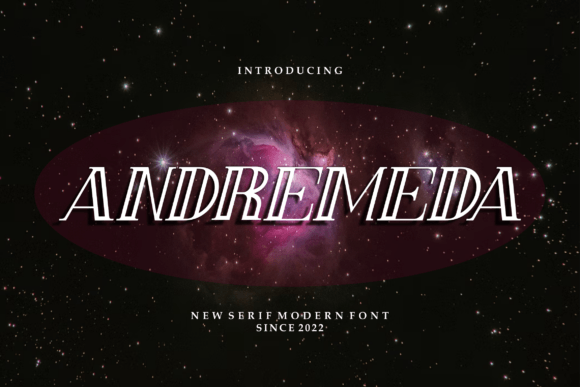
Andremeda: The Cool and Modern Display Font That Elevates Your Design
Fonts are more than just letters—they’re the first impression your design makes. Choosing the right one can turn a basic layout into something memorable, professional, and visually appealing. Andremeda is a display font that stands out with its bold personality and modern flair. It’s not just another typeface; it's a statement tool for designers, marketers, and content creators who want to leave an impact.
What Makes Andremeda Unique?
Andremeda is a contemporary display font designed to catch attention without overwhelming the viewer. Its clean lines and geometric shapes give it a sleek, modern look that works well in both digital and print formats. Whether you're creating a logo, designing a website header, or crafting social media graphics, Andremeda adds a layer of sophistication and clarity.
Unlike many display fonts that lean too heavily on serifs or overly stylized features, Andremeda balances style with readability. This makes it versatile enough to be used in a wide range of applications—from headlines and banners to posters and presentations.
Who Should Use Andremeda?
- Designers: Looking for a fresh take on modern typography.
- Marketers: Wanting to create eye-catching promotional materials.
- Bloggers and Content Creators: Seeking to enhance headers and titles with a unique aesthetic.
- Entrepreneurs and Small Business Owners: Needing a professional yet stylish font for branding elements.
- Educators and Presenters: Aiming to make slides and infographics more engaging.
Common Mistakes When Using Andremeda
Despite its strengths, even the best fonts can fall flat if misused. Here are some common pitfalls people encounter when working with Andremeda—and how to avoid them:
1. Overusing It in Body Text
One of the biggest mistakes is using Andremeda as a body font. While it shines in headlines and short text, it wasn’t designed for long paragraphs. Its thick strokes and condensed characters can make reading dense blocks of text uncomfortable and reduce comprehension.
Better approach: Reserve Andremeda for display purposes only. Pair it with a more legible sans-serif or serif font like Roboto, Lato, or Georgia for body copy. For example, use Andremeda for your website’s hero section and switch to Open Sans for the main content area.
2. Ignoring Kerning and Spacing
Display fonts like Andremeda often have tighter spacing between characters, which looks great at large sizes but can become problematic when scaled down. If you don’t adjust the kerning and tracking properly, the text may appear cramped or uneven, especially in smaller sizes.
Better approach: Always check and tweak the spacing settings in your design software. In Adobe Photoshop or Illustrator, use the Character panel to fine-tune the tracking. If you're working in web design, consider using CSS properties like kerning or letter-spacing to maintain visual harmony.
3. Mismatching Color and Background
Another oversight is not considering contrast when applying Andremeda to different backgrounds. Because of its strong presence, it needs adequate contrast to remain readable and effective. Placing it over busy or dark backgrounds can diminish its impact and confuse the viewer.
Better approach: Test Andremeda against various background colors and images. A solid white or light gray background usually provides the clearest contrast. If using it on a colored or textured backdrop, ensure the text remains legible by adjusting opacity or adding a subtle drop shadow.
How to Evaluate Andremeda Before Committing
Before downloading or purchasing Andremeda, it’s essential to evaluate whether it aligns with your project’s goals. Here’s what to keep in mind:
Check Licensing and Usage Rights
Not all fonts are free for commercial use. Some versions of Andremeda might require a license depending on your intended application—especially if you plan to use it in logos, websites, or marketing materials. Always review the licensing agreement provided by the foundry or platform where you download it.
Tip: Look for trusted sources like Google Fonts, Adobe Fonts, or verified font marketplaces such as Creative Market or MyFonts. These platforms typically provide clear licensing terms and usage guidelines.
Test It in Real Contexts
Many designers fall into the trap of selecting a font based solely on its appearance in a preview. However, fonts behave differently when applied to actual content. Download a trial version of Andremeda and test it across your target devices and screen sizes.
Example: Try using Andremeda on a mobile-responsive website. How does it look on a smartphone? Does it hold up under different lighting conditions? You’ll find these real-world tests reveal much more than a static image ever could.
Consider Cultural and Brand Relevance
A font should reflect the identity of your brand or message. Andremeda has a bold, confident look that may suit tech startups, fashion brands, or creative agencies. But it might not fit the tone of a traditional business or educational institution.
Better choice: Match Andremeda to projects where modernity and energy are key. For instance, a new app launch or a lifestyle blog would benefit from its dynamic feel, while a law firm’s brochure probably wouldn’t.
Practical Tips for Using Andremeda Effectively
Here are some actionable tips to help you get the most out of Andremeda:
- Use it for Impactful Headlines: Andremeda is perfect for drawing attention. Apply it to headlines, banners, or taglines where you want to make a bold visual statement.
- Pair it Thoughtfully: As mentioned earlier, choose a complementary font for supporting text. The right pairing can balance aesthetics and functionality.
- Limit Its Use: Don’t let it dominate every element. Strategic placement ensures it stays powerful rather than becoming distracting.
- Adjust Weight and Size: Play with different weights (bold, regular, light) and sizes to add depth and hierarchy to your designs.
- Don’t Rely on Effects Alone: While effects like outlines or shadows can enhance visibility, they shouldn’t be used to compensate for poor spacing or low contrast.
When Not to Use Andremeda
Just because Andremeda is cool doesn’t mean it’s always the best option. Avoid using it in the following situations:
- Projects requiring high readability in small text sizes (e.g., menus, forms, PDF documents).
- Formal or traditional contexts where a more classic font is appropriate.
- Multi-lingual layouts unless the font supports the necessary glyphs and character sets.
- Any scenario where performance matters, such as embedding in a slow-loading website. Ensure it’s optimized for web use.
Real-World Example
Imagine a coffee shop launching a new seasonal campaign. They use Andremeda for their poster headline: “Winter Brew Special.” It grabs attention instantly. However, they also tried using it for the price list, which led to confusion among customers. After switching to a simpler font for pricing and keeping Andremeda for the title, the response improved significantly. This illustrates how context and font function must align for success.
Where to Find Andremeda
If you’re convinced Andremeda is the right fit, you’ll need to source it carefully. Look for reputable providers to ensure quality and proper licensing. Many designers prefer purchasing from well-known font libraries or checking for web-safe alternatives that offer similar styles.
Some platforms allow you to preview Andremeda before buying, so take advantage of those options. You can also search for free alternatives online, but verify that they meet your usage requirements.
Final Thoughts on Choosing Andremeda
Fonts are a crucial part of visual communication, and Andremeda brings a modern edge that can elevate your work. However, its effectiveness depends on thoughtful application. By avoiding common mistakes and understanding its limitations, you can use Andremeda to create compelling designs that resonate with your audience.
Next time you're choosing a display font, remember: style is important, but usability and purpose matter even more. Add Andremeda confidently to your toolkit—but do so with awareness and intention. The results will speak for themselves.