Shocker: A Bold Display Font for Creative Impact
Fonts are more than just letters on a page—they’re the visual heartbeat of your design. When you want to make a statement, grab attention, or inject energy into your work, you need something that stands out. Enter Shocker, a dynamic display font duo featuring glitched and lightning-shaped characters designed to electrify your creative projects. Whether you're a designer, marketer, blogger, or entrepreneur, Shocker brings an edge that’s hard to ignore.
What Makes Shocker Unique?
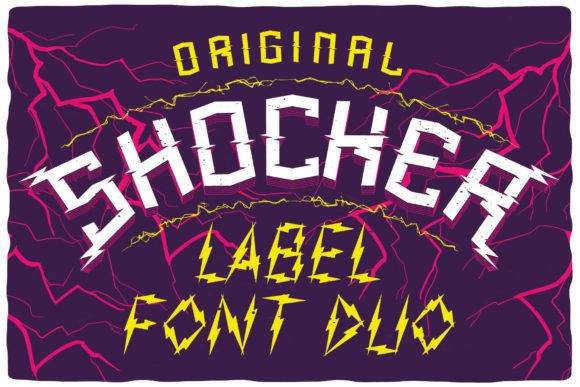
At first glance, Shocker catches your eye with its bold, futuristic aesthetic. The typeface combines sharp angles, digital distortions, and dramatic spacing to create a sense of urgency and intensity. One of its most distinctive features is the integration of glitched effects—those jagged, pixelated breaks in character shapes that evoke a digital rebellion. Paired with stylized lightning motifs, this font isn’t just visually striking; it’s emotionally charged.
The two versions in the Shocker duo offer flexibility. One might lean heavier into the glitch effect, while the other uses subtle lightning accents to maintain legibility without losing impact. This makes them ideal for a range of applications from high-energy event posters to sleek website headers.
Design Characteristics You Should Know
- High Contrast: Thick and thin strokes give each character depth and drama.
- Glitch Elements: Built-in distortions add a modern, edgy feel without overdoing it.
- Lightning Accents: These sharp, angular details amplify the visual punch.
- Variable Widths: Some styles have extended characters for maximum flair.
Where Can You Use Shocker?
Shocker isn’t just another font—it’s a tool for storytelling through typography. Let’s explore how different users can leverage it effectively.
For Designers and Creatives
If you're working on brand identities, editorial layouts, or motion graphics, Shocker can be your secret weapon. It’s perfect for creating tension between text and background, especially when paired with dark or neon color schemes. Try using it in poster designs for concerts, art shows, or tech events where a modern, disruptive look is key.
One practical tip: use the glitched version sparingly. While it adds intrigue, too much distortion can hurt readability. Save it for headlines or short phrases where impact matters more than clarity. For longer blocks of text, stick to the cleaner style or pair it with a complementary sans-serif font for balance.
For Marketers and Entrepreneurs
In the world of marketing, standing out is everything. Shocker can help you craft headlines that stop people in their tracks. Imagine launching a new product with a tagline like “BREAK THE RULES” in the glitched variant—its chaotic energy mirrors the disruption your business aims to bring.
Use it in social media posts, email campaigns, or promotional banners where you want to communicate innovation, speed, or transformation. Just keep in mind that not every audience will resonate with such a strong visual style. Test it with your target demographic before fully committing, especially if you're aiming for a more professional or minimalist brand tone.
For Bloggers and Content Creators
Blogs, newsletters, and YouTube thumbnails often need personality to cut through the noise. Shocker is great for section titles, pull quotes, or video intros. Its unique style helps highlight key messages and makes your content more memorable.
A popular approach is to use the lightning-style variant as a header and then switch to a clean sans-serif for body copy. This keeps the focus on your message while maintaining a cohesive look. If you're designing a thumbnail for a vlog about creativity or technology, try layering Shocker with a gradient overlay or neon glow for extra pop.
For Educators and Presenters
Slides and presentations don’t always have to be dull. Shocker can add a spark to your title slides, especially when discussing topics like innovation, change, or digital trends. Think of it as a way to set the tone before diving into data or theory.
However, since it's a display font, avoid using it throughout your entire presentation. Instead, reserve it for key moments when you want to emphasize a point or transition between sections. Pair it with monochrome backgrounds for contrast and ensure the text size is large enough to read clearly from a distance.
Real-World Project Ideas with Shocker
Here are some tangible ways to apply Shocker across different formats:
- Event Branding: Use the glitched variant for festival posters, music events, or gaming expos to convey excitement and unpredictability.
- Website Headers: Make your homepage stand out by using Shocker for main headings, particularly in industries like tech, fashion, or entertainment.
- Merchandise Design: T-shirts, stickers, and limited-edition prints can benefit from the boldness of Shocker. Combine it with abstract visuals or minimal text for a powerful look.
- Infographics and Data Visualization: Add a touch of Shocker to labels or callouts to draw attention to critical stats or insights.
- Social Media Banners: Create Instagram or Facebook banners that reflect your brand’s energetic side. Use the lightning-style variant for hashtags or usernames.
Styling Tips for Maximum Effect
To get the most out of Shocker, consider these styling techniques:
- Color Gradients: Apply vibrant gradients across the font to enhance the digital aesthetic.
- Layer Text Over Imagery: Place Shocker headlines over action shots or abstract patterns for a layered, immersive effect.
- Play With Opacity: Slightly transparent text can blend seamlessly with busy backgrounds while still making a statement.
- Experiment With Spacing: Adjust letter and word spacing to match the mood—tighter for intensity, looser for a more explosive feel.
- Combine With Icons: Lightning and glitch fonts pair well with circuit board, electric bolt, or digital-themed icons for a unified theme.
How to Keep It Professional Yet Edgy
While Shocker is inherently bold, it can still be used in a professional context with careful application. Here’s how to strike the right balance:
First, limit its use to one or two elements per project. Too many glitched or lightning-laced characters can overwhelm the viewer. Second, choose appropriate colors. Neon greens and blues complement the font’s vibe, but deep blacks or metallic shades can also create a sleek, high-tech appearance. Finally, ensure consistency—if you’re using Shocker in multiple parts of a design, maintain the same treatment (color, size, spacing) to preserve visual harmony.
Adapting for Different Platforms
On websites, Shocker works best in headers due to its display nature. In print, it shines on large-format signage, logos, and packaging. For digital platforms like Instagram or TikTok, use it in short bursts to capture attention quickly. Remember, mobile screens demand clarity—stick to the cleaner version if necessary to maintain legibility.
Getting Started with Shocker
Ready to bring Shocker into your workflow? Here’s how to begin:
- Download and Install: Ensure both styles of the Shocker font are installed correctly on your system or design software.
- Test in Context: Open a sample layout or project and see how the font looks alongside your images and other text.
- Adjust and Refine: Play with spacing, alignment, and color until the design feels balanced and impactful.
- Seek Feedback: Show your work to colleagues or friends to gauge reactions and make improvements based on real-world input.
Pro Tip: Layering for Depth
Want to take your designs even further? Try layering Shocker text with subtle textures or overlays. A light scan-line pattern or a faint digital grid can enhance the font’s futuristic appeal without making it feel cluttered. This technique is especially effective for tech startups or digital agencies looking to showcase a cutting-edge image.
Why Choose Shocker Over Other Fonts?
There are countless display fonts available, but few combine glitch aesthetics with lightning-inspired forms as cohesively as Shocker. It’s versatile enough to suit both playful and serious tones, depending on how you apply it. Unlike generic bold fonts, Shocker offers a narrative—each character tells a story of chaos and power.
Its dual nature allows you to tailor your message precisely. Need something aggressive for a protest sign? Go glitch-heavy. Want to highlight a breakthrough moment in a corporate report? Opt for the subtler lightning accents. That kind of adaptability is rare in the world of display typography.
Case Study: Shocker in Action
Take the example of a small independent game studio launching a new title called “Digital Storm.” They used the glitched version of Shocker for their trailer title card, layered it with a thunderstorm backdrop, and added neon lighting for contrast. The result was a cinematic opener that immediately conveyed the game’s fast-paced, unpredictable gameplay. Fans took notice, and within days, the hashtag #DigitalStorm started trending organically.
This illustrates how the right font can align with your message and become part of your brand’s identity. Shocker didn’t just look good—it helped tell the story of the game itself.
Final Thoughts on Using Shocker
Shocker is more than just a font—it’s a creative catalyst. By blending glitch aesthetics with lightning-styled characters, it gives designers a fresh way to express energy, movement, and innovation. As long as you use it thoughtfully and strategically, Shocker can elevate your work across multiple mediums.
Whether you’re crafting a logo, designing a poster, or building a web presence, remember that typography is a form of expression. Shocker invites you to break free from the ordinary and embrace the extraordinary. So go ahead—let your ideas shock the world.