Afokem: The Stylish Display Font That Elevates Your Creative Projects
Fonts are more than just a way to present text—they’re a design element that shapes how your message is received. In the world of display fonts, Afokem stands out for its bold personality and refined elegance. Whether you're crafting a logo, designing a website, or creating social media content, Afokem adds a touch of sophistication that can transform your work from ordinary to extraordinary.
What Makes Afokem Special?
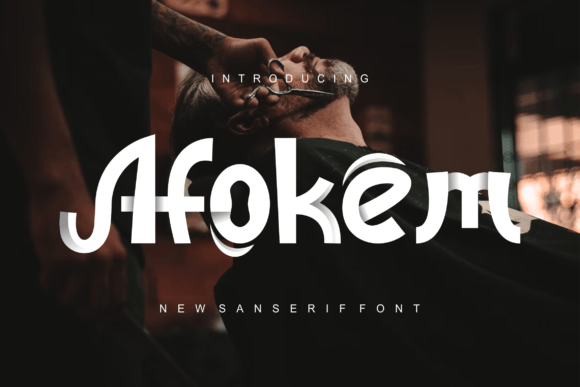
Afokem is a modern display font characterized by its clean lines, balanced proportions, and subtle yet striking details. It blends contemporary minimalism with classic typographic elements, making it versatile enough for both digital and print use. This font is particularly favored by designers who want to make a visual impact without overwhelming their audience.
Its name may not be as widely recognized as some other popular display fonts like Bebas Neue or Cinzel, but among those who know it, Afokem has built a reputation for being an artistic and functional choice. It’s ideal for headlines, titles, branding materials, and even short-form content where aesthetics matter most.
Common Mistakes When Choosing and Using Afokem
While Afokem is visually appealing, it's easy to misuse it—especially if you're new to typography or rely too heavily on first impressions. Here are some common pitfalls to avoid when working with this font:
1. Overusing Afokem in Body Text
Display fonts like Afokem are designed to grab attention, not to be read at length. Its stylized letterforms and lack of subtle variation between characters (like serifs or varying stroke widths) can reduce legibility in large blocks of text. Many beginners mistakenly apply Afokem across entire paragraphs or articles, which leads to eye strain and diminished readability.
Better approach: Reserve Afokem for headings, logos, or short impactful phrases. Pair it with a more readable sans-serif or serif font for body copy. For example, using Afokem for a brand slogan while pairing it with Lato or Georgia for the rest of the text ensures clarity and maintains visual harmony.
2. Ignoring Color and Background Compatibility
Afokem features strong contrast and unique shapes, so placing it on busy backgrounds or using inappropriate colors can muddy its impact. Some users overlook the importance of color contrast, leading to poor visibility or a cluttered appearance.
Better approach: Test Afokem against different background colors and lighting conditions. A high-contrast combination, such as white text on a dark background or black on light gray, will highlight its beauty. Avoid gradients or textured backgrounds unless they're intentionally designed to complement the font.
3. Not Checking Licensing Before Use
One of the most overlooked aspects when downloading any font is understanding its licensing terms. While many free fonts have generous permissions, others require attribution, restrict commercial use, or need additional purchases for full access.
Better approach: Always verify the license agreement before incorporating Afokem into a project. If you're planning to use it in a commercial context, such as a client’s branding or a product label, ensure you have the right to do so. Consider purchasing a premium version if necessary to avoid legal complications down the line.
4. Misapplying Afokem in All-Caps Without Care
Many display fonts look great in all-caps, but Afokem is no exception. However, using it in all caps for extended sections can feel aggressive or overly formal. Some users apply it this way without considering tone or audience, resulting in a disconnect between the message and the visual style.
Better approach: Use Afokem in all-caps sparingly and only when appropriate. For instance, it works well in event posters or call-to-action buttons. Otherwise, mix case usage to maintain a natural flow and keep the tone conversational.
5. Skipping Font Pairing Tests
Typography is about balance. Even though Afokem is stylish on its own, it needs a complementary font to function effectively in a layout. Rushing through font pairing decisions can lead to clashing styles or a jarring user experience.
Better approach: Experiment with font pairings using tools like Adobe Fonts or Canva. Try combining Afokem with simpler, neutral fonts such as Open Sans or Merriweather. This allows Afokem to shine while ensuring the supporting text remains clear and professional.
When to Choose Afokem Over Other Display Fonts
Choosing the right font depends on the purpose of your design. Afokem excels in situations where you want to convey confidence, creativity, and a polished aesthetic. Here’s when it shines best:
- Branding and logos: Its elegant curves and strong presence help create memorable brand identities.
- Social media graphics: Afokem adds flair to posts, banners, and cover images, especially when paired with minimalist layouts.
- Wedding invitations or event posters: The font brings a touch of class and uniqueness to special occasion designs.
- Product packaging: If you're looking to elevate your packaging with a sophisticated typeface, Afokem delivers.
However, it’s not always the best fit. If your design requires a vintage or highly decorative look, you might find Afokem too understated. Similarly, in contexts where readability is paramount, such as financial reports or technical documents, opt for a more traditional font instead.
How to Download and Install Afokem
Before you start using Afokem, you’ll need to download and install it correctly. Here’s a quick guide to help you get started:
- Visit a trusted font marketplace or creator site to download Afokem. Ensure the source is reputable to avoid malware or pirated versions.
- Extract the downloaded ZIP file (if applicable) and locate the .OTF or .TTF font file.
- Install the font by double-clicking the file and selecting “Install.” Alternatively, drag the font file into your system’s Fonts folder.
- Once installed, open your design software (e.g., Photoshop, Illustrator, Figma) and select Afokem from the font menu.
If you're using Afokem on a website, you'll need to upload it via a web font service or embed it directly using CSS. Make sure to include fallback fonts in your code to ensure compatibility across devices and browsers.
Real-World Examples of Afokem in Action
To understand how Afokem enhances visual communication, consider these examples:
- Logo Design: A boutique coffee shop used Afokem for its logo, giving it a modern yet warm appeal that resonated with customers.
- Event Poster: An art gallery incorporated Afokem in the title of their exhibition poster, drawing attention with its sleek and artistic form.
- Blog Header: A lifestyle blogger applied Afokem to her blog headers, instantly elevating the page's visual appeal and aligning with her brand's creative identity.
In each case, the font was used strategically—not as a default setting but as a key design component that enhanced the overall message and mood.
Things to Check Before Committing to Afokem
Before finalizing your design or committing to using Afokem in a professional project, ask yourself the following questions:
- Does Afokem support the language and character set I need? (Check the font’s glyphs and diacritics.)
- Will it work well with my existing design elements and color scheme?
- Is there a suitable secondary font to balance the hierarchy of information?
- Am I aware of the licensing restrictions, especially for commercial use?
- Have I tested it across multiple platforms and screen sizes?
Answering these questions helps ensure that Afokem serves your project’s goals rather than becoming a distraction.
The Right Way to Evaluate Afokem for Your Needs
Not every font is right for every project. To evaluate whether Afokem is the best choice, consider the following:
- Usability: How does it perform in your specific application? Does it hold up in small sizes or long headlines?
- Style Matching: Does Afokem reflect the tone and personality of your brand or message? If your brand is playful, does the font support that energy?
- Technical Performance: Is the font rendering smoothly across all platforms? Are there issues with spacing or kerning that need adjustment?
You might also want to compare Afokem side-by-side with similar display fonts to see which one aligns better with your vision. Tools like Typewolf or Google Fonts’ pairing generator can be incredibly helpful during this process.
Conclusion
Afokem is a standout display font that combines elegance with versatility. But like any powerful tool, it must be used thoughtfully. By avoiding common mistakes such as overuse, improper pairing, and ignoring licensing, you can harness its full potential to enhance your creative output.
Remember, typography is more than just picking a pretty font—it's about creating a cohesive and effective visual narrative. With the right approach, Afokem can become a signature element of your designs, helping you stand out in a crowded digital landscape.